Case Study - RV Manufacturing
Streamline your entire process from Quoting through Production Schedule Management!

Background
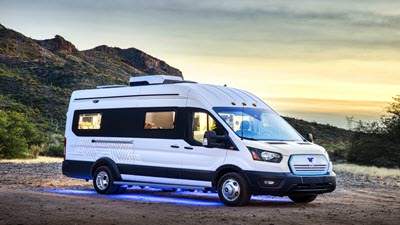 The company in this case study manufactures and sells build-to-order recreational vehicles to dealers. Just like in the automotive business, dealers buy in two ways: 1) inventory with options they think will sell (stock on the ground), 2) customized to customer requirements (order and wait).
Because each vehicle is unique, there is no part number at the time of quoting. Because there is part number for the vehicle, determining the cost and price is more complex than adding line items to a quote. The cost is function of: 1) the parts that go into the vehicle (the BOM), 2) the process time required to assemble (production router).
Because of this complexity, preparing a quote is a complex process. Whether an ERP software or Excel is used, preparing the quote is not immediate like in the car business - the customer must wait for a price.
The company in this case study manufactures and sells build-to-order recreational vehicles to dealers. Just like in the automotive business, dealers buy in two ways: 1) inventory with options they think will sell (stock on the ground), 2) customized to customer requirements (order and wait).
Because each vehicle is unique, there is no part number at the time of quoting. Because there is part number for the vehicle, determining the cost and price is more complex than adding line items to a quote. The cost is function of: 1) the parts that go into the vehicle (the BOM), 2) the process time required to assemble (production router).
Because of this complexity, preparing a quote is a complex process. Whether an ERP software or Excel is used, preparing the quote is not immediate like in the car business - the customer must wait for a price.
Problem
 The company has recognized that the significant manual effort in scheduling requires they do something different in how they run the business. One solution explored is an ERP software. This is a big investment and change in processes for employees.
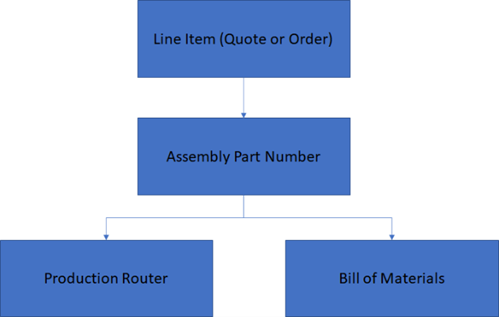
ERP software is designed to have an assembly (top level) part number for every line item (quote or order). Below this assembly part number is a unique production router and bill of materials. Using an ERP for a configured product to create a quote with 5 line items would require creation of: 5 assembly part numbers, 5 production routers and 5 bills of material (BOM). This is made somewhat easier by duplicating and then editing an existing router and BOM. The router is still a challenge however, because the process time for each of the production steps would need to be estimated and updated.
The company has recognized that the significant manual effort in scheduling requires they do something different in how they run the business. One solution explored is an ERP software. This is a big investment and change in processes for employees.
ERP software is designed to have an assembly (top level) part number for every line item (quote or order). Below this assembly part number is a unique production router and bill of materials. Using an ERP for a configured product to create a quote with 5 line items would require creation of: 5 assembly part numbers, 5 production routers and 5 bills of material (BOM). This is made somewhat easier by duplicating and then editing an existing router and BOM. The router is still a challenge however, because the process time for each of the production steps would need to be estimated and updated.
BOM
The Bill of Materials is clearly quite extensive and is defined as:
- Base materials/items. Items that are common across all vehicles regardless of options selected. This is model specific
- Subassemblies for each option selected
Router
The base vehicle has a defined set of processes required such as:- WELD - Welding
- PAINT = Painting
- CHASS - Chassis
- PWRTRN - Powertrain
- BODY - Body
- ELECT - Electrical
- FITOUT - Fit out (Kitchen, etc
- WHEELS - Wheels
- FINISH - Finish
- FINAL - Final Test
Solution

- Attributes (Product Specific)
- Items
- Tasks (Process Steps)
- Rules (Product Specific)
1) Attributes
 The attributes that the user would select are shown here. These are setup in Velosity.
Shown below are the Attributes as setup in Velosity

2) Items
 The items that are added by the Rules or Item Mapping are shown here.
Shown below are Items as setup in Velosity

3) Tasks
Shown below are the Tasks as setup in Velosity

4) Rules
 The rules that are evaluated to generate the router and BOM are shown here.
Shown below are Rules as setup in Velosity